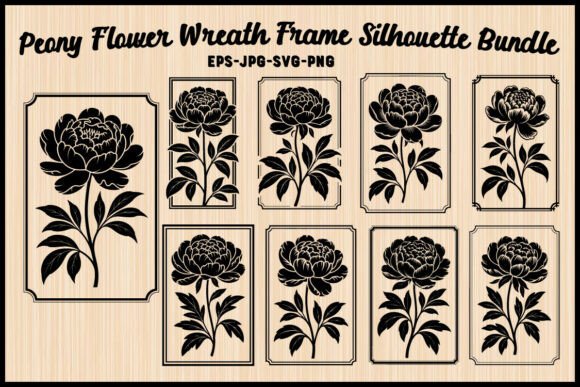
Peony Flower Silhouette with Frame Set: A Guide to Elegant Design
There is a timeless quality to the peony that makes it a perennial favorite in design, from wedding invitations to sophisticated home decor. When you combine that fullness of bloom with structured, classic framing elements, you create a visual language that speaks of romance and stability. The Peony Flower Silhouette with Frame Set offers exactly this blend, providing nine unique designs where intricate floral silhouettes meet decorative wreaths and frames. This collection is not merely a set of images; it is a toolkit for creating personalized monograms, wall art, stationery, and logos. However, possessing the files is only half the battle. Many creators overlook the nuances of file formats, scalability, and application, leading to frustrating results that undermine the elegance of the original design.
Understanding the Value of Vector Precision
The primary allure of this bundle lies in its versatility across different mediums. Whether you are cutting vinyl decals for a boutique storefront or preparing high-resolution prints for a gallery wall, the underlying technology matters immensely. The set includes SVG, PNG, JPG, and EPS files, each serving a distinct purpose. A common mistake beginners make is treating all these formats as interchangeable. They often download the entire package but default to using the JPG version for every project because it is the most familiar.
This approach can severely compromise your final product. If you use a raster image like a JPG for a large-scale vinyl decal or embroidery pattern, the edges will appear jagged or pixelated when scaled up. The delicate lines of the peony petals and the fine details of the frame will lose their definition. To avoid this, you must understand that the SVG (Scalable Vector Graphics) and EPS (Encapsulated PostScript) files are your most valuable assets for precision work. These vector formats allow you to scale the design infinitely without losing quality, ensuring that a tiny logo on a business card looks just as crisp as a massive mural on a wall.
Matching File Formats to Your Tools
Before you begin any project, take a moment to evaluate your workflow. If you are using a Cricut or Silhouette Cameo machine, the SVG files are non-negotiable for clean cuts. For professional graphic designers working in Adobe Illustrator or CorelDRAW, the EPS files offer the deepest level of editability, allowing you to ungroup elements and adjust the silhouette's path if necessary. The PNG files, with their transparent backgrounds, are excellent for digital layering in Photoshop or Canva, particularly when overlaying text onto the frame. By matching the correct format to your specific tool, you ensure efficiency and maintain the sophisticated aesthetic intended by the designer.
Avoiding Common Layout Pitfalls
One of the most overlooked aspects of using a pre-made frame set is the balance between the floral element and the text. The Peony Flower Silhouette with Frame Set provides a ready-made layout, which is convenient, but it requires careful customization to look authentic. A frequent error is overcrowding the negative space within the frame. Creators often feel compelled to fill every inch with names, dates, or slogans, resulting in a cluttered appearance that obscures the beauty of the peony blooms.
Consider the principle of "less is more." The strength of these designs lies in the contrast between the organic, flowing lines of the flowers and the geometric structure of the frame. When adding a wedding monogram or an initial, ensure there is sufficient breathing room around the letters. If the text fights with the floral silhouette for attention, the design loses its elegance. Instead, treat the frame as a boundary that guides the eye toward the center, where your personalization should reside. Use a font weight that complements the thickness of the frame lines rather than overpowering them.
Color and Contrast Considerations
Another area where projects often stumble is color selection. Because these are silhouette-based designs, they rely heavily on contrast to define their shape. Using a light-colored font against a light background, or placing a complex floral frame over a busy pattern, can render the design invisible or muddy. Before finalizing your design, check the contrast ratio. If you are printing on textured paper or applying a decal to a colored surface, test a small sample first. The romantic appeal of the peony is best preserved when the silhouette stands out clearly against its backdrop.
Strategic Application for Maximum Impact
The true potential of this bundle is realized when you apply the designs strategically across various media. For entrepreneurs and small business owners, these templates are ideal for creating a cohesive brand identity. Imagine a line of stationery where the envelope seal features one of the nine wreath designs, while the letterhead uses a simplified version of the same silhouette. Consistency builds recognition. However, do not simply copy-paste the same design everywhere. Vary the orientation or scale slightly to keep the branding dynamic while maintaining unity.
For hobbyists engaged in embroidery, the vector nature of the files allows for precise digitization. Unlike low-resolution clipart, the paths in the SVG and EPS files translate cleanly into stitch patterns, preserving the intricate details of the petals. Similarly, for web designers, the high-resolution PNGs ensure that the images load quickly yet remain sharp on high-density screens. The key is to recognize the strengths of each file type and deploy them where they perform best.
What to Check Before You Download
When evaluating any digital asset, due diligence is essential. Before purchasing or downloading the Peony Flower Silhouette with Frame Set, verify the license terms. Are you allowed to use these designs for commercial products? Some bundles restrict usage to personal projects only, which could lead to legal complications if you plan to sell items featuring the artwork. Additionally, check the resolution specifications. While the description promises high-quality files, confirming the DPI (dots per inch) for the raster versions ensures they meet your printing standards.
Also, consider your own technical proficiency. If you are new to vector editing software, the ability to modify the EPS files might seem daunting. In such cases, stick to the SVG files for cutting machines or the PNGs for simple overlays until you become more comfortable. There is no need to force a complex workflow if a simpler solution achieves the desired result. The goal is to enhance your creative output, not complicate it.
Final Thoughts on Creative Execution
The Peony Flower Silhouette with Frame Set is a powerful resource for anyone looking to infuse their projects with sophistication and charm. By understanding the differences between file formats, respecting the balance of layout, and choosing colors wisely, you can avoid the common pitfalls that diminish the quality of digital designs. Whether you are crafting a wedding invitation, designing a logo, or creating home decor, these nine unique designs offer a solid foundation. Remember, the tools are only as good as the vision behind them. Take the time to customize thoughtfully, and let the natural beauty of the peony silhouette shine through your work.